How to Use Facebook for Business
If you have started a new business or if you have a small business, you should utilize each opportunity to reach more people. Facebook is definitely one of the best ways for that because it has billions of users. Billions of users can give your business the best results if you act well. Firstly, you should learn how to use Facebook for Business.
Facebook Business Page
Regardless of being local or global, each company tries to maintain its presence on the internet because it enables and carries big growth potential. Big growth brings prestige, engagements, and sales as well. The Facebook business page is one of the ways to maintain that presence.
Facebook reported that it had reached over 2.5 active users, and it continues to increase. The potential it carries cannot be found on any other platforms. Facebook offers various promotion opportunities to business pages. Besides, the Facebook business page has almost all other features in personal accounts on Facebook. You can send and receive messages from personal and other business accounts; you can comment and like posts while you can share as well.
Creating a Facebook Account for Business Page
Creating a Facebook account for a Business page is easy. The important point is how you optimize it. The SEO strategies that you use for your business page can determine your success. To transfer more details, we can examine each step one by one.
Time needed: 10 minutes.
Here are the steps to create a Facebook account for a Business page.
- Register for a Business page.
You can register from the usual register page for a business account. You just need to tick the right option.
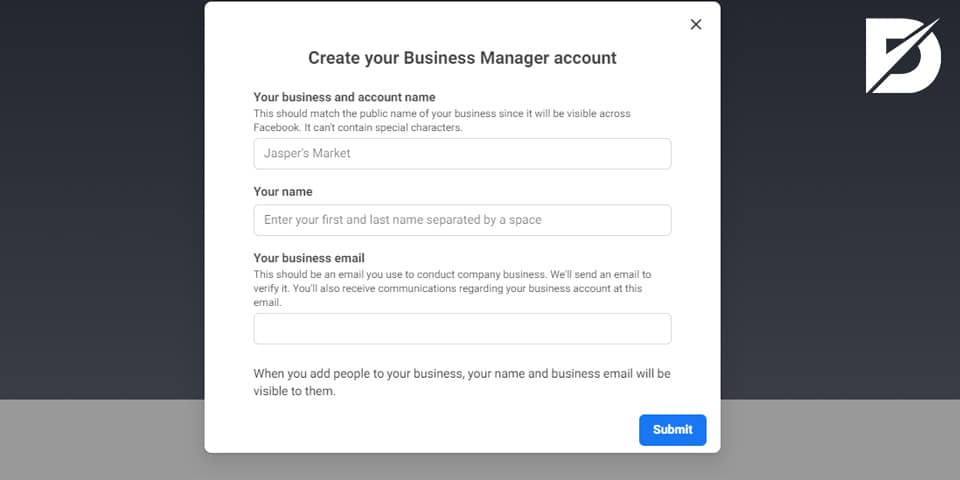
- Fill in the needed questions.
Facebook asks some questions to define your work and introduce it to users interested. Therefore, it would be best to give as much information as your company’s address, phone number, business category, and any other basic information.

- Add photos.
Profile and cover pictures can help you to present your company image. You can upload your logo as a profile picture while you can be as creative as possible for the cover picture.

- Examine and fill sections.
Facebook gives various sections where you can show your company and your works. Filling those sections enables you to demonstrate your work and increase reliability.

Home
The home section of your account is the place where users can see your updates and posts while they can reach basic information about your company. You can make this section lively by posting and updating your page.
About
About section should contain specific information about your company because many users search for that. By saying specific, opening and closing hours, your company’s address, phone numbers, email addresses, and your website’s URL can be part of the about section. If interested customers can easily reach that information, they would be encouraged to take action.
Events
The events section is the place where you can create and share particular events. Users can reach all your events via one page, while also you can invite your leads or customers.
Posts
Each post you share is presented in the posts section. You do not have to spend additional effort to fill here. Posting regularly would be more than enough.
Services
The services page is one of the most significant sections in your account because you can appeal to so many users by filling the part appropriately. You can write about each service you offer as a showcase and give details about them, such as duration or price. Therefore, serious buyers will mostly contact you for further information rather than visitors who want to get basic information.

Shop
Recently, Facebook has allowed business pages to sell directly via Facebook. You can upload your stocks, and your visitors can buy your products without being directed to other websites. Once the sale is made, the price is transferred to your company’s bank account.
Reviews
As can be understood via the name, reviews of your clients are displayed in this section. Even though Facebook allows you to hide this section, we do not recommend you to do so. It is because it contributes to your company’s reliability more than you can imagine. While the overall ratings are displayed on the top of the page, interested buyers can and probably enthusiastically will examine your company’s reviews and services. Therefore, ask and encourage your clients to give you reviews.
Community
The community section is effective to appeal to clients as well as the reviews section. Posts from your previous customers are displayed on there. It enables keeping interaction alive. Moreover, your customers and leads can examine your store from there.
Offers
You can share new discounts and offers with your customers from this section. Even though they can see offers from your updates, the section encourages your visitors to follow you. When they follow you, they will be able to reach the recent offers easier.

Info and Ads
Since Facebook allows you to share ads and promotions via your business page, there is a whole other section for ads. Your visitors can see all ads that you are running currently.
Photos: Photos section includes all images that you have posted. When clients want to examine a visual proof of your work, they directly prefer going to the “Photos” tab.
Advantages of Facebook for Business Page
Using Facebook for business brings various profits, including gaining leads, sales, and engagements. It shows your company’s image and be an opportunity to strengthen your online prestige. Thus, let’s see those advantages deeply.
By including your website’s URL, it is more chance to appeal to more users to your professional website. Therefore, as many visitors as you get, the chance of being visible increases. It also boosts your website’s traffic, which is significant to getting sales and engagements.
If you include your contact info in the “About” section of your business page, especially serious buyers will not hesitate to contact you for more information about your services. While you can distinguish interested visitors, you can have the chance to convince them to use your services.
If you want to use the Facebook business page more comprehensively, you may try to engage your customers by showing your company’s inside. You can post about the workplace, processes in the company, working environment, your company’s and employees’ successes. Hence, while your customers can witness the processes inside the business, your reliability increases.
Facebook has more benefits than you may expect because it is a crucial and efficient tool for SEO. Companies such as Facebook and/or YouTube are determinants for search engine results, even though you may think they are only good for social media presence. The traffic and engagement you get via Facebook will excellently help improve your SEO.
How to Use Facebook for Business
There are various practices for using a Facebook business account. These practices keep you engaged with your target audience, allow you to maintain the interaction, improve your SEO, and more concrete benefits such as sales and earnings. You can examine these practices given below to use Facebook’s every opportunity available.

Target Audience
Before using this practice, you should already know your target audience and their marketing behaviors. Once you have an idea about their interests, you can start to give promotions. While promoting, Facebook allows you to choose specific ages, locations, or interests for people who will see these ads.
Contests
Giveaways and contests are effective practices to get organic engagement. Only, you should be careful about Facebook’s rules and guidelines for contests. Otherwise, you may struggle with judicial processes.
Publishing Tools
Improving your SEO and increasing your page’s traffic requires keeping your content fresh and regular. However, you may not be available each minute to post. You do not need to worry because other third-party apps can help you to arrange future posts. You can prepare your content in advance posted in a scheduled time.
Facebook Insights
Facebook Insights is an analytics tool to measure the efficiency of your campaigns and ads. You can see how many engagements you get as well as how many people have reached your content. Therefore, you can analyze the success rate of your content and ads to decide on better strategies in the future.

Facebook Messenger
Facebook requires Messenger if you want to respond to the messages you get. Your response time is observed and can be seen by your clients. It is the perfect opportunity to show your clients that you respond fast and can help anytime. Besides, most users prefer chatting if it is available due to its comfortability.
Events
As mentioned above, Facebook has the Events section for businesses. You can create new events and invite as many guests and visitors as you want.
Facebook ads
Facebook ads are a paid option to reach more people. You can start campaigns by targeting specific demographics. Payment options also differ, such as overall campaign budget and daily budget for a campaign. Your ads’ performances are also saved to help you enhance your strategies.

Facebook Live
Via Facebook Live, you can broadcast for free and have real-time interaction with your target audience. It is a perfect way to get new followers because you can impress your leads with a direct conversation.
Interaction
You need to keep the interaction alive to get engagements since the aim is to initially interact and impress your followers. To maintain the interaction, post regularly and work on your content. High-quality content and regular conversations via your posts are significant for strengthening your online presence.
FAQs on Facebook for Business
You should sign up differently to have a business account on Facebook. Although personal and business accounts have similar features, there are additional options and opportunities for Facebook for Business.
Facebook does not set any rules or limits for your budget. Depending on your company’s advertisement strategies and budget, you are free to prepare it.
Regardless of the size of your business, anyone can open a business account. You may have a startup or a small business, and you may try to grow that business. Facebook for Business is an opportunity to grow your business and boost your traffic without any limitations.
Facebook has the most users, with more than 2.5 billion members. It has the biggest audience, and it allows you to reach more significant populations by having you running campaigns. While you can enhance your company’s prestige with the engagements you get, your clients can contact you quickly for anything.
Registering for a business account on Facebook is free. Once you have created your page, you can run campaigns to reach a wider audience. Only those campaigns and promotions are charged with a specific amount you arrange before running the campaigns.
Facebook for Business in Short
The size of your business does not matter if you want to dive into Facebook for Business. Each business is allowed to use its opportunities by only opening a business account. Engagements and conversions you get increase as your effort increases. Therefore, you should not open a page and post anything for months. You should keep the page alive and try to interact with your leads and clients.
Interacting with your followers is the first reason why to open a Facebook account for your business. It is because visitors can have the necessary information by checking your website. Since Facebook is a social media platform, you should keep the main purpose in mind.
To use Facebook with its highest potential, you should learn more about the app and examine each feature because they may be useful eventually. Different sections on your account and various practices that you can benefit from are available for all business accounts. You just need to spend a bit of effort and reach more people. Once you set up your profile, all you have to do is draw traffic. Here’s how.
The post How to Use Facebook for Business is republished from Dopinger Blog


Yorumlar
Yorum Gönder