How to Indent in HTML? (Simple Guide)
HTML (Hypertext Markup Language) is a markup language used to assist in the preparation of pages for websites when you enter your browser. It is supposed to be a programming language but it is not a programming language. HTML codes are used for the creation of a web page of text and visual content. In this article, we will touch upon how to indent in HTML.
Indenting Using HTML
You can use an inline style in HTML to get all the results given above. If you want to see a style only once, you can check the example below.
<p style = “margin-left: 40px”> This text is indented. </p>
Above is an example where all the text in the tag of the paragraph is indented 40 pixels from the left. Other paragraph tags have no indentation.
<p style = “text-indent: 40px”> This text is indented. </p>
The example above shows that only the first line of the paragraph is indented 40 pixels from the left.
What Is CSS?
Cascading Style Sheets (CSS) is a definition language we use when we want to render websites visually.
There are many ways to indent text. One of them is to use CSS. Most people use this method the most for indenting paragraphs or text. See below for examples of how text is indented with CSS.
These will be in between your <head> </head> HTML tags.
The example we give below creates a style class called “tab” that allows the paragraph and text to be indented 40 pixels from the left.
<style type = “text / css”>
<! –
.tab {margin-left: 40px; }
->
</style>
Type the code above in the <head> section, then add it to your paragraph (<p>) tags and use it as we showed it.
<p class = “tab”> A tab example </p>
As you can see above, when you add CSS to your HTML document, it’s called “inline” CSS. This is very easy if you want to make changes quickly, but not easy to change in the long run.
Also, instead, take all your CSS code and place it in a separate file with the .css extension.
Link a CSS File
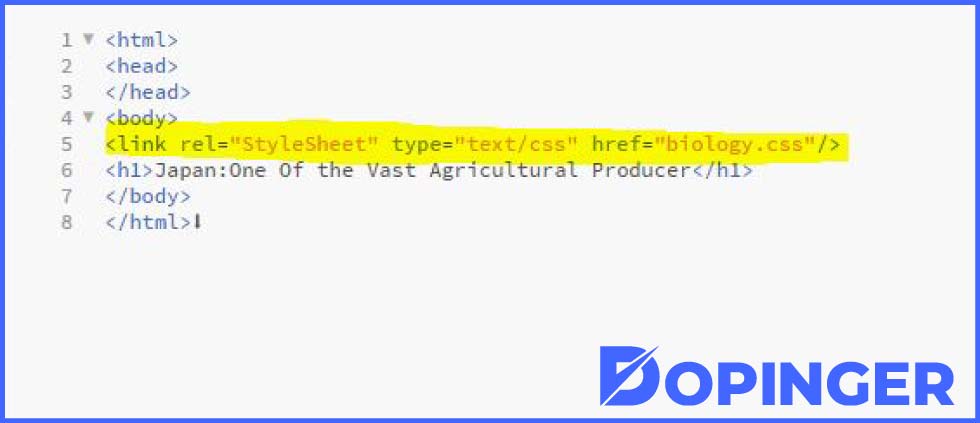
If you want to link to this file later, you can link using any HTML document, and this HTML document can also use these CSS properties. To avoid any difficulties when changing the CSS later, you should use a separate CSS file.
To link to a different CSS file, add the following line to the <head> element (after the <head> tag and before the </head> tag) in the HTML document.
<link rel = “stylesheet” Type = “text / css” href = “https://ift.tt/3pyd94j;>
After creating this .css file, edit the file, and you’ll add the same CSS code as we show, excluding the <style> and comment tags.
.tab {margin-left: 40px; }
After completing the steps above, you can indent any text using the same <p class = “tab”> example we showed above as the last step.
You can also use the line below instead of using the above CSS line if you want to indent only the first line of a paragraph.
.tab {text indent: 40px}
Another way to indent is to use a percentage.
Also, you can change the left indent to the right indent by changing the margin-left to margin-right.
FAQs on Indent in HTML
Cascading Style Sheets (CSS) is a definition language we use when we want to render websites visually.
You can change the left indent to the right indent by changing the margin-left to margin-right.
Instead of indenting 40 pixels, you can change the indent to 10% to indent up to 10% of the current appearance of the text.
It can be done using an inline style inside HTML.
<p style = “text-indent: 40px”> This text is indented. </p> this way only the first line will be indented.
Conclusion of Indenting Using HTML
In this article, we explained how you can indent using HTML and CSS. I hope we were able to help you.
The post How to Indent in HTML? (Simple Guide) is republished from Dopinger Blog


Yorumlar
Yorum Gönder